A controller sketch lives or dies by its touchpoints. You can nail the silhouette and the button placement, but if the handles look like smooth plastic, the design feels unfinished. It lacks the "pro" feel that users expect from high-performance hardware.
The trap of the micro-pattern
Hand-drawing a grip pattern is a momentum killer. To make a crosshatch look like a performance material, every line needs to be perfectly spaced. One slip or one inconsistent gap and the surface looks warped.
Most designers start with good intentions. They draw the first ten lines carefully. By line fifty, the hand gets tired and the spacing starts to drift. The texture becomes a distraction rather than a detail.
Defining the grip with Crosshatch and Diagonal tiles
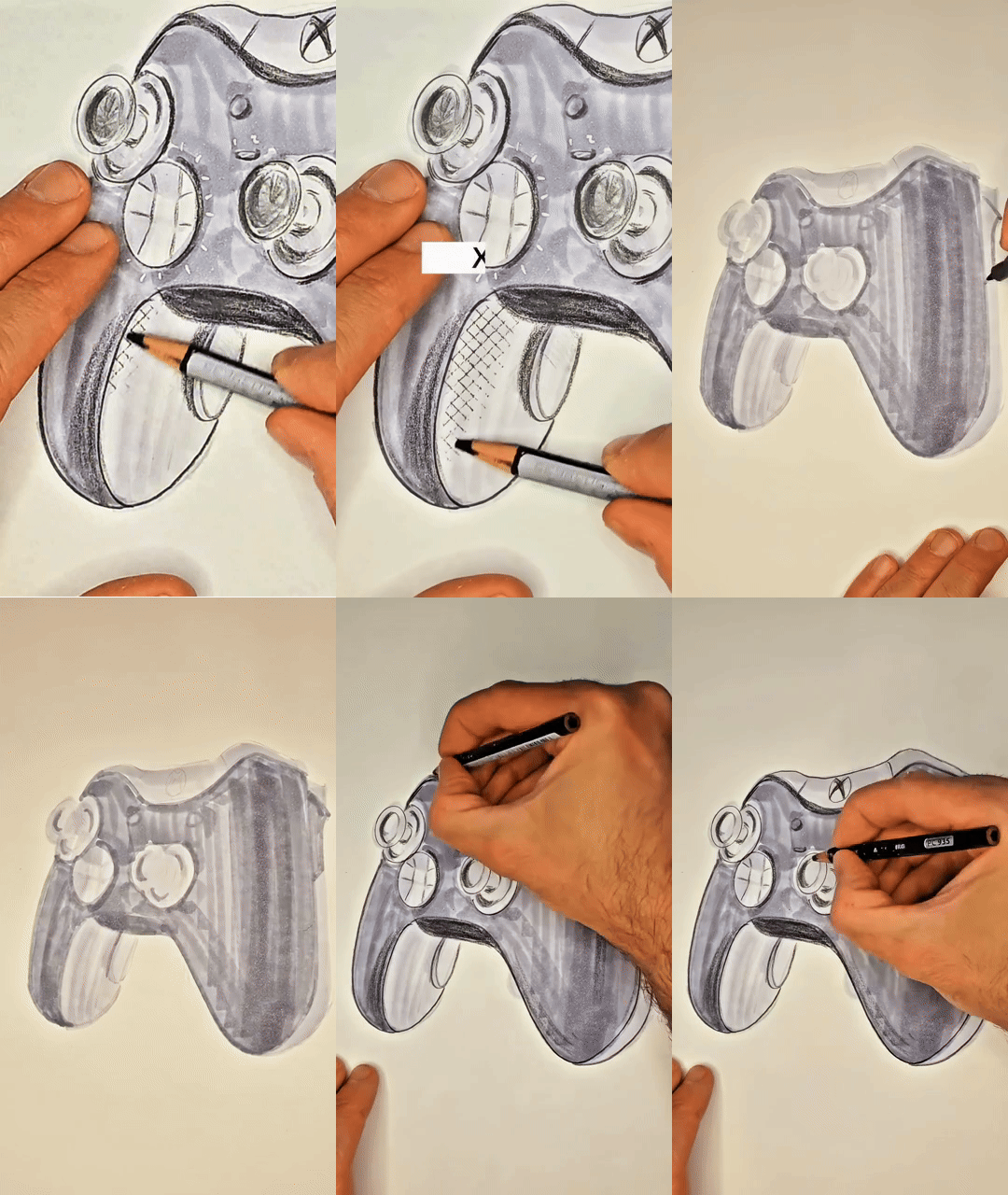
In this sketch, the Crosshatch tile defines the primary palm contact area. It gives the handle that rubberized, high-friction look instantly. It suggests a technical material without requiring twenty minutes of hatching.
The Diagonal Lines tile works well for secondary transition zones or trigger textures. By layering these two patterns, you create a visual hierarchy. The viewer understands which parts of the controller are for comfort and which are for precision.
Texture as a functional indicator
In industrial design, texture isn't just decoration. It communicates function. A heavy crosshatch says "grip here." A fine diagonal line suggests a directional surface or a tactile feedback zone.
Using SketchTiles allows you to keep your focus on the form. You don't have to slow down to "render." You place the tile, swipe your marker or pencil, and the material is locked in. The sketch maintains its energy because you aren't bogged down in the weeds.
Where to use this
• Power tool handles where sweat-resistance is key.
• Steering wheel wraps for automotive interiors.
• Camera body grips for professional DSLR concepts.
• Footwear outsoles that need to look rugged.
• Luggage handles meant for heavy lifting.
• Anywhere a repeated pattern defines the material.
Try this in your next sketch
Look at a product in your office that has a textured grip. If you had to communicate that specific friction to a client using only ten seconds of drawing time, how would you represent it?
What are SketchTiles
SketchTiles are physical texture stencils built for designers, by designers. Place a tile under your page, trace with any pencil or marker, and the pattern transfers onto your sketch. Each set includes four double-sided tiles, etched with eight precise patterns: Diagonal Lines, Crosshatch, Isometric Dot Grid, and Hexagonal Grid.
SketchTiles are available as The Essentials Set and the Essentials Complete Set. Shop on Amazon.




Comments